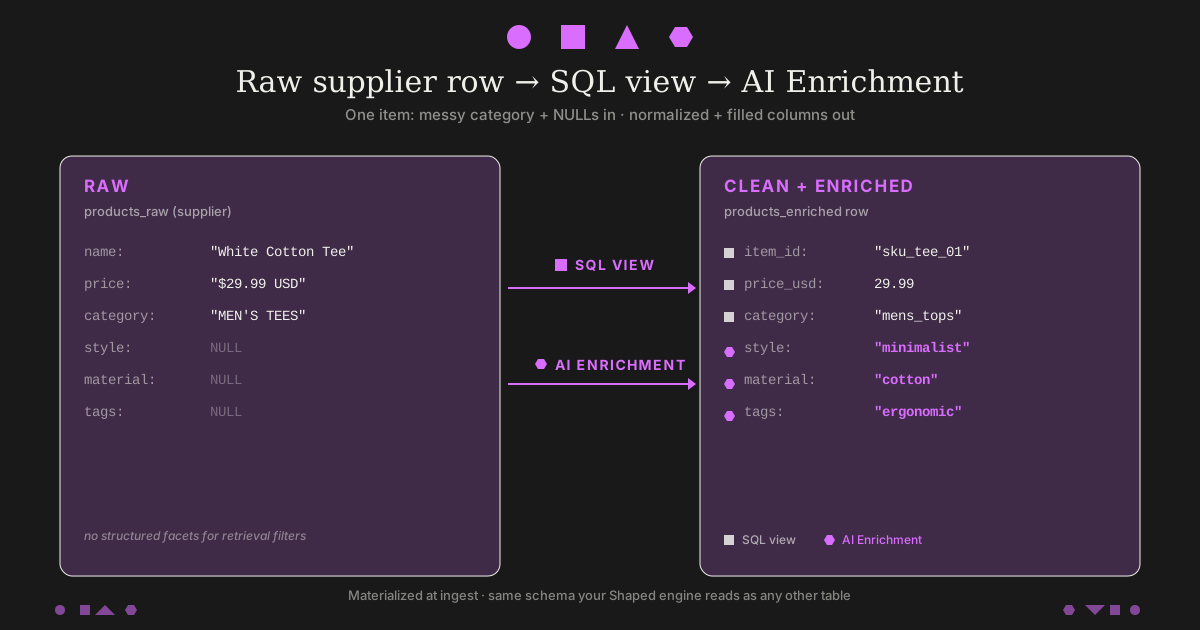
Someone searches minimalist white cotton tee, office-ready and the engine returns rows that shouldn’t be there: out of stock, style still empty, a tee miscategorized so filters miss it, the same item twice under different supplier SKUs.
That’s a catalog problem, not an embedding problem.
Cleaning before ingest usually loses to the roadmap—“we’ll finish it in dbt” keeps slipping while search is already live. Here’s a concrete path in Shaped: SQL views on ClickHouse for dedupe, joins, casts, and normalization, then AI Enrichment views where you add columns in YAML and spell out what you want in the prompt. Both stay in sync as upstream rows change.
A Shaped engine reads the enriched table like anything else—lexical and vector retrieval, filters on those columns, and ORDER BY score(...).
Quick answer: two view types
- SQL view — ClickHouse against synced tables: dedupe, casts, joins, normalization.
- AI Enrichment view — One LLM call per source row (batched/cached by the platform). You list
enriched_output_columnsand describe each field inprompt; the model fills those fields fromsource_columns(e.g. name, description, category). There is no hidden ontology—you specify the schema and allowed values, same as you would in any structured-extraction task.
Both refresh when upstream rows change. The engine’s config points at the view name; it does not care whether a column came from SQL or an LLM.
Why catalog shape matters for retrieval
Retrieval is mostly “score these rows under these filters.” Duplicates waste top slots. Bad categories break facet filters. Strings in numeric columns break sort. Attributes buried only in prose never become WHERE clauses or typed features.
Knock-on effect (one sentence): if filters are noisy, your logged training data for reranking is noisy too.
Cleaning belongs before the engine ingests the item table. The only design choice is where you run that transform.
How to build this yourself
Below is the same stack most teams end up with if they don’t buy a packaged transform layer—just laid out so you can estimate the work.
Path A — SQL transforms (e.g. dbt)
Build: Models that normalize keys, cast types, dedupe, join reference data.
Gets expensive when: rules explode (supplier-specific quirks), you need something that is not in structured columns (extract from free text), and tests pass but production still drifts when vendors change formats.
Path B — Nightly LLM worker
Build: Job that calls an API per row, writes enriched columns back to your warehouse, handles backlog and retries.
Gets expensive when: You are operating backoff, dead letters, cache invalidation on text changes, and cost/latency monitors—i.e. a small service around “what should have been a table column.”
Path C — Stacked tables (raw → normalized → enriched → “for search”)
Build: Separate materializations per stage, each with its own job schedule.
Gets expensive when: Relevance regresses and you’re diffing four tables to see which layer stale’d.
None of these are wrong—they’re what teams do when the item table has to be good enough for production retrieval.
How Shaped fits
Shaped runs the same two primitives against data you connect (Postgres, BigQuery, etc.): SQL views on ClickHouse, and AI Enrichment views with managed batching/retries. Schema changes trigger re-materialization; streaming connectors are on the order of tens of seconds for fresh rows.
What you still own: the SQL and the prompt. What you do not have to host: a separate enrichment worker and a second persistence layer unless you want one.
SQL Views: Joins, types, rules
SQL views run ClickHouse SQL against your tables. They support joins, aggregations, casts, regex, and the full ClickHouse function set. You get two flavors:
MATERIALIZED_VIEW(default). Query runs and the result is stored as a physical table. Updates automatically when source tables change. Use this for anything an engine reads frequently.VIEW(on-demand). Query runs every time the view is read. Always fresh, no storage. Use for low-traffic or freshness-critical reads.
Set the flavor with sql_view_type on the API payload.
AI Enrichment Views: The LLM Half
AI Enrichment views run an LLM over each row of a source table and write the output to new columns. How does the model know style vs material? It does not infer your taxonomy by magic—you list names in enriched_output_columns and define meaning, allowed values, and fallbacks in prompt. The runtime parses the response into those columns (with retries/validation on Shaped’s side). If you want a cross-cutting facet like “ergonomic,” use a string column such as tags and ask for comma-separated labels instead of a one-off boolean that only makes sense for one vertical.
The contract:
# views/<name>.yaml — AI enrichment view shape (CLI / console upload)
name: <view_name>
transform_type: AI_ENRICHMENT
source_dataset: <table_or_view_name>
source_columns:
- <columns_to_pass_to_the_llm>
source_columns_in_output:
- <columns_to_copy_through_unchanged>
enriched_output_columns:
- <new_columns_the_llm_will_fill>
prompt: |
<instructions for the model>
Each row in the source dataset becomes one LLM call. The response is parsed into enriched_output_columns and written to a new table named after the view. Source rows that change get re-enriched automatically.
Cost is per row at ingest, not per retrieval call. Rough order of magnitude for a small chat model: single-digit dollars per million rows for a one-time backfill, then tiny incremental cost as new rows land—versus paying on every user query if the LLM sits in the request path.
When to Use SQL vs AI Enrichment
When in doubt, prefer SQL whenever the transformation is rule-based—joins, typing, lookups, branching on known values. Reach for AI Enrichment when the signal lives in unstructured text (or images) and belongs in typed columns at ingest instead of at query time.
| Problem | Use SQL view | Use AI Enrichment view |
|---|---|---|
| Normalize a price column (strings to floats, currency conversion) | CAST, multiIf, conversions between units/currencies | — |
| Join inventory and reviews into a single item row | LEFT JOIN across tables | — |
| Dedup by canonical key (e.g. SKU prefix) | GROUP BY + argMax(updated_at) | — |
Translate shipping_tier: 4 into a customer-facing summary | If the mapping is fixed and small: multiIf | If the mapping is large or you want it indexed as text |
Extract style, material, fit from a free-text description | — | Prompt the LLM with the description; emit as new columns |
Cross-cutting facets (ergonomic, organic, …) that don’t deserve a dedicated boolean per vertical | — | Emit a tags string (or normalize further in a downstream SQL view) |
| Generate semantic tags (mood, theme, vibe) for a movie or playlist | — | Prompt with title + genres; emit a tag list |
| Caption a product image | — | Multimodal prompt against an image_url column |
| Filter to “active” SKUs only | WHERE inventory_count > 0 | — |
Building a Cleaned Catalog: 5 Steps
The scenario: a fashion marketplace where the catalog comes from suppliers. Inconsistent categories. Duplicate SKUs. Prices in mixed currencies. Free-text descriptions. The style field exists on maybe 40% of rows.
We’ll build, in order:
- The raw tables.
- A SQL view that normalizes and dedupes.
- An AI Enrichment view that fills in missing structured attributes.
- An engine that reads the enriched view.
- A ShapedQL query that exercises the cleaned data.
Step 1: Connect Raw Tables
Provision tables with POST /v2/tables (same shape as shaped create-table --file). See Data unification for how connectors fit into the pipeline. For Postgres the connector discovers schema from your database—optional columns narrows what gets synced (API reference).
# tables/products_raw.yaml
name: products_raw
schema_type: POSTGRES
host: your-db-host.example.com
port: 5432
user: your_user
password: your_password
database: your_database
table: products
replication_key: updated_at
columns:
- product_id
- sku_prefix
- name
- description
- category
- price # stored as text like "$49.99" upstream — normalize in the SQL view
- currency
- image_url
- updated_at
shaped create-table --file tables/products_raw.yaml
Same idea for inventory (product_id, inventory_count, updated_at) and currency_rates (currency, usd_rate, updated_at): separate table configs with schema_type: POSTGRES (or another batch connector). Once connected, rows land within ~30 seconds for streaming connectors or ~15 minutes for batch ones.
Step 2: SQL View — Normalize, Dedup, Convert Currency
This is the SQL normalization pass: dedupe by SKU prefix, coerce category strings to snake_case, convert prices to USD, drop rows missing essential fields.
# views/products_clean.yaml
name: products_clean
view_type: SQL
sql_view_type: MATERIALIZED_VIEW
sql_query: |
WITH latest AS (
SELECT
argMax(product_id, updated_at) AS item_id,
sku_prefix,
argMax(name, updated_at) AS name,
argMax(description, updated_at) AS description,
argMax(category, updated_at) AS category_raw,
argMax(price, updated_at) AS price_raw,
argMax(currency, updated_at) AS currency,
argMax(image_url, updated_at) AS image_url,
max(updated_at) AS updated_at
FROM products_raw
GROUP BY sku_prefix
)
SELECT
l.item_id,
l.sku_prefix,
l.name,
l.description,
lowerUTF8(replaceRegexpAll(l.category_raw, '[^a-zA-Z0-9]+', '_')) AS category,
toFloat64OrZero(replaceAll(l.price_raw, '$', ''))
* coalesce(c.usd_rate, 1.0) AS price_usd,
l.image_url,
coalesce(i.inventory_count, 0) AS inventory_count,
l.updated_at
FROM latest l
LEFT JOIN inventory i ON l.item_id = i.product_id
LEFT JOIN currency_rates c ON l.currency = c.currency
WHERE l.name != '' AND l.description != ''
shaped create-view --file views/products_clean.yaml
What’s happening:
argMax(<col>, updated_at)persku_prefixkeeps the most recently updated value of each column—cheap dedup without hand-written merge rules per field.replaceRegexpAll+lowerUTF8collapse supplier category strings into one token bucket per leaf, e.g."MEN'S TEES","mens tops"→mens_tops(same idea as shoe categories collapsing tomens_shoes).toFloat64OrZerocoerces"$49.99"to a float, returning0on bad rows instead of failing the whole materialization.- The
LEFT JOINs pull inventory and current FX rates without writing to upstream.
Sanity-check the view before training an engine—run dataset SQL against data.<table> with POST /v2/query (same SQL goes in shaped query / the console when supported). Step 5 uses ShapedQL (retrieve, text_search, …) against an engine; here we’re only inspecting the materialized view:
SELECT
category,
count() AS n
FROM data.products_clean
GROUP BY category
ORDER BY n DESC
LIMIT 20
If the categories aren’t collapsing the way you expect, catch it here—before those values flow into filters and training logs downstream.
Step 3: AI Enrichment View — Fill In the Structured Attributes
The cleaned table still has gaps. style, material, fit, use_case, season are inconsistent or missing. We’ll add a tags string for cross-cutting facets (e.g. ergonomic) so we are not hard-coding a boolean that only fits one product type. We also emit semantic_summary for embeddings.
Each name in enriched_output_columns must appear in the prompt with rules; the ingest path parses the model output into those columns—there is no side channel.
# views/products_enriched.yaml
name: products_enriched
transform_type: AI_ENRICHMENT
source_dataset: products_clean
source_columns:
- name
- description
- category
source_columns_in_output:
- item_id
- sku_prefix
- name
- category
- price_usd
- image_url
- inventory_count
enriched_output_columns:
- style
- material
- fit
- use_case
- season
- tags
- semantic_summary
prompt: |
You are a fashion catalog analyst. Using the product name, description, and normalized category, produce values for:
- style: one of streetwear, classic, athleisure, formal, workwear, vintage, minimalist, y2k, boho. Use unknown if you can't tell.
- material: primary material lowercase (cotton, denim, leather, polyester, wool). unknown if not mentioned.
- fit: one of slim, regular, relaxed, oversized, tailored, unknown.
- use_case: one of casual, office, formal, athletic, outdoor, loungewear.
- season: one of spring, summer, fall, winter, all_season.
- tags: comma-separated lowercase tokens for cross-cutting attributes that are explicitly supported by the text—e.g. ergonomic, organic, wrinkle_free. Use an empty string if none apply. Do not invent tags.
- semantic_summary: 1-2 factual sentences describing what the product is and what makes it distinctive. No marketing language. No exclamation points.
If a field cannot be inferred from the inputs, use unknown (or all_season for season) rather than guessing.
shaped create-view --file views/products_enriched.yaml
What we are doing with the prompt:
- Fixed vocabularies for facet columns (
style,use_case, …). - Explicit “don’t guess” fallbacks.
tagsfor awkward booleans—works the same for desk chairs (ergonomic) and apparel if the copy supports it.
After backfill, products_enriched has the pass-through columns plus seven LLM columns, all queryable on data.products_enriched like the SQL fields.
Step 4: Engine Config That Reads the Enriched View
EngineConfigV2 wires data (which tables/views the engine ingests) and index (lexical + vector encoders). Embeddings use hugging_face with model_name and item_fields. schema_override sets column types (Text, Numerical, TextCategory, …).
# engines/fashion_search.yaml
version: v2
name: fashion_search
description: Semantic search over enriched catalog rows
data:
item_table:
type: table
name: products_enriched
schedule: "@hourly"
schema_override:
item:
id: item_id
features:
- name: sku_prefix
type: Text
- name: name
type: Text
- name: description
type: Text
- name: category
type: TextCategory
- name: price_usd
type: Numerical
- name: image_url
type: Url
- name: inventory_count
type: Numerical
- name: style
type: TextCategory
- name: material
type: TextCategory
- name: fit
type: TextCategory
- name: use_case
type: TextCategory
- name: season
type: TextCategory
- name: tags
type: Text
- name: semantic_summary
type: Text
index:
embeddings:
- name: catalog_text_embedding
encoder:
type: hugging_face
model_name: sentence-transformers/all-MiniLM-L6-v2
item_fields:
- name
- semantic_summary
- style
- material
- tags
lexical_search:
tokenizer:
type: stemmer
item_fields:
- name
- category
- semantic_summary
- tags
shaped create-engine --file engines/fashion_search.yaml
Shaped backfills the embedding index against the enriched view. When products_raw later changes (a supplier pushes new SKUs), the dedup re-runs in products_clean, the LLM enrichment re-runs in products_enriched, and the embedding index updates. You don’t touch the engine YAML for every upstream tweak.
Step 5: Query — Semantics From the Search Box, Rules From the App
text_search binds the query string to the embedding you configured (catalog_text_embedding here), i.e. it drives retrieval over name, semantic_summary, style, material, tags without parsing the query into facets at request time.
WHERE is for constraints your application already knows—inventory policy, a price cap from a slider, SKU allowlists, locale—not for guessing structured facets from free text (that would be a separate NLU layer outside Shaped, which we’re not covering here).
-- Natural language drives retrieval; max_price + in-stock come from UI / API params.
SELECT * FROM retrieve(
text_search(
text_embedding_ref = 'catalog_text_embedding',
input_text_query = $query_text,
limit = 200
)
)
WHERE inventory_count > 0
AND price_usd <= $max_price
ORDER BY score(expression = 'similarity_score') DESC
LIMIT 20
Why enrichment still matters for this query:
semantic_summary(and related columns in the embedding) give the vector index something stable to latch onto—otherwise “office-ready tee” might weak-match messy supplier copy alone.inventory_countandprice_usdare real columns from your SQL view—hard filters evaluate as plain predicates with no LLM in the query path.
If you do filter on style, use_case, or substring-match tags (e.g. ergonomic), treat those as explicit inputs from the UI—bind parameters; do not try to infer them from $query_text inside this query unless you own a separate NLU step.
From the application:
# rank.py
import os
import httpx
API_KEY = os.environ["SHAPED_API_KEY"]
def search(query_text: str, max_price: float = 80.0):
response = httpx.post(
"https://api.shaped.ai/v2/engines/fashion_search/query",
headers={"x-api-key": API_KEY},
json={
"query": (
"SELECT * FROM retrieve(text_search("
"text_embedding_ref='catalog_text_embedding', "
"input_text_query=$query_text, limit=200)) "
"WHERE inventory_count > 0 "
"AND price_usd <= $max_price "
"ORDER BY score(expression='similarity_score') DESC "
"LIMIT 20"
),
"parameters": {"query_text": query_text, "max_price": max_price},
},
timeout=2.0,
)
response.raise_for_status()
return response.json()["results"]
That’s the full pipeline. YAML for tables, views, and engine; one ShapedQL query; Python shows how to call the query API.
Beyond Fashion: Three More Use Cases
Same pattern, different verticals:
Use Case 1: Translating Status Codes for Agent Retrieval
A customer support agent reads from your orders table. The table stores shipping_tier: 4, order_status: 7, priority_level: 2. The agent retrieves the row and answers, “Your order has shipping tier 4 and status 7.” Useless.
The fix is an AI Enrichment view that materializes a customer-facing summary alongside the raw codes. The agent retrieves the summary; the codes stay queryable for joins. Full walkthrough is in The Status Code Problem, but the shape:
# views/orders_with_summary.yaml
name: orders_with_summary
transform_type: AI_ENRICHMENT
source_dataset: orders
source_columns:
- shipping_tier
- order_status
- priority_level
- created_at
source_columns_in_output:
- order_id
- user_id
- shipping_tier
- order_status
enriched_output_columns:
- ai_order_summary
prompt: >
Translate the shipping tier, order status, and priority level into a 2-3 sentence customer-facing summary.
Shipping tiers: 1=Economy Ground, 2=Standard, 3=Expedited, 4=Express (2 days, FedEx), 5=Overnight, 6=Same-Day.
Order statuses: 1=processing, 2=payment confirmed, 3=picking, 4=packing, 5=ready to ship, 6=label created, 7=in transit, 8=out for delivery, 9=delivered, 10=exception.
Priority: 0=standard, 1=low, 2=medium, 3=high, 4=urgent, 5=critical.
Write plain conversational prose suitable for a customer—not a bullet list or machine-readable wrapper.
The agent indexes ai_order_summary and answers in sentences instead of codes.
Use Case 2: Tag-shaped facets instead of one-off booleans
Someone filters for “ergonomic” across office chairs, standing desks, and a few apparel SKUs that call it out in copy. A dedicated is_ergonomic column does not generalize; a tags string (or JSON array if you prefer) does.
Materialize it once:
# views/products_attributes.yaml
name: products_attributes
transform_type: AI_ENRICHMENT
source_dataset: products_clean
source_columns:
- name
- description
- category
source_columns_in_output:
- item_id
- name
- category
- price
enriched_output_columns:
- material
- primary_color
- tags
- use_case
- style_tag
prompt: >
From the product name, description, and category, infer: material (lowercase primary material, or unknown),
primary_color (dominant color lowercase, or unknown), tags (comma-separated lowercase tokens explicitly supported
by the text—e.g. ergonomic, adjustable, compact; empty string if none), use_case (one of office, dining, living_room,
outdoor, bedroom, commercial), and style_tag (one of modern, traditional, industrial, mid_century, rustic, minimalist).
Then retrieval can use WHERE tags ILIKE '%ergonomic%' (or a token index if you normalize further in SQL) as a hard filter before an agent sees the shortlist. Our post on building reliable agents expands on pushing structure upstream instead of patching it solely in prompts.
Use Case 3: Captioning Product Images
If your catalog has rich images and thin text, multimodal enrichment fills in the gap. Pass an image_url column in source_columns and the view routes through a multimodal model:
# views/products_image_captions.yaml
name: products_image_captions
transform_type: AI_ENRICHMENT
source_dataset: products_clean
source_columns:
- name
- image_url
source_columns_in_output:
- item_id
- name
enriched_output_columns:
- image_caption
- visual_style
prompt: >
Analyze the product image together with the product name. Produce image_caption: 1-2 factual sentences covering color,
materials, and key visual features a shopper would notice. Produce visual_style as one of modern, traditional, industrial,
mid_century, rustic, minimalist. Emit only those two fields.
If your image column is named something other than image_url, drop a five-line SQL view in front of it that renames the column. That’s the multimodal contract.
Comparison: Traditional ETL vs Shaped Views
| Component | Traditional stack | Shaped views |
|---|---|---|
| SQL transforms | dbt project + Airflow | SQL view (single YAML) |
| LLM enrichment | Custom Python service + Redis cache | AI Enrichment view (single YAML) |
| Source-to-search lag | Hours (nightly job) | Seconds (streaming) |
| Materialization | Manual writes back to source DB | Automatic, materialized in Shaped |
| Schema changes | Update dbt + redeploy service | Update view definition; re-backfill automatically |
| Failure modes | Drift between layers, silent staleness | Single layer; lineage from source → views → engine |
| Code to maintain | ~1,000 lines (dbt + Python) | ~50 lines (YAML) |
| Operational cost | dbt Cloud + worker + cache (varies) | Bundled with the Shaped plan you run |
| Time to first working path | Often multi-sprint | Depends on connectors; often days vs. months |
Closing thoughts
If the item table is wrong, every retrieval stack you put on top will look worse than it should. SQL views and AI Enrichment views are one way to keep transforms next to the data the engine ingests—SQL-first for joins and typing, LLM enrichment for what doesn’t compress into rules—without standing up a separate enrichment service.
Try it: console.shaped.ai/register — the walkthrough above is sized to run on sandbox credit.
See our Docs
- Tables and Views
- AI Enrichment guide
- Movie enrichment tutorial
- Connect data to an engine
- Shaped API v2
Want us to walk you through it?
Book a 30-minute slot with an engineer if you want a second pair of eyes on your schema.
See Shaped in action
Talk to an engineer about your specific use case — search, recommendations, or feed ranking.