
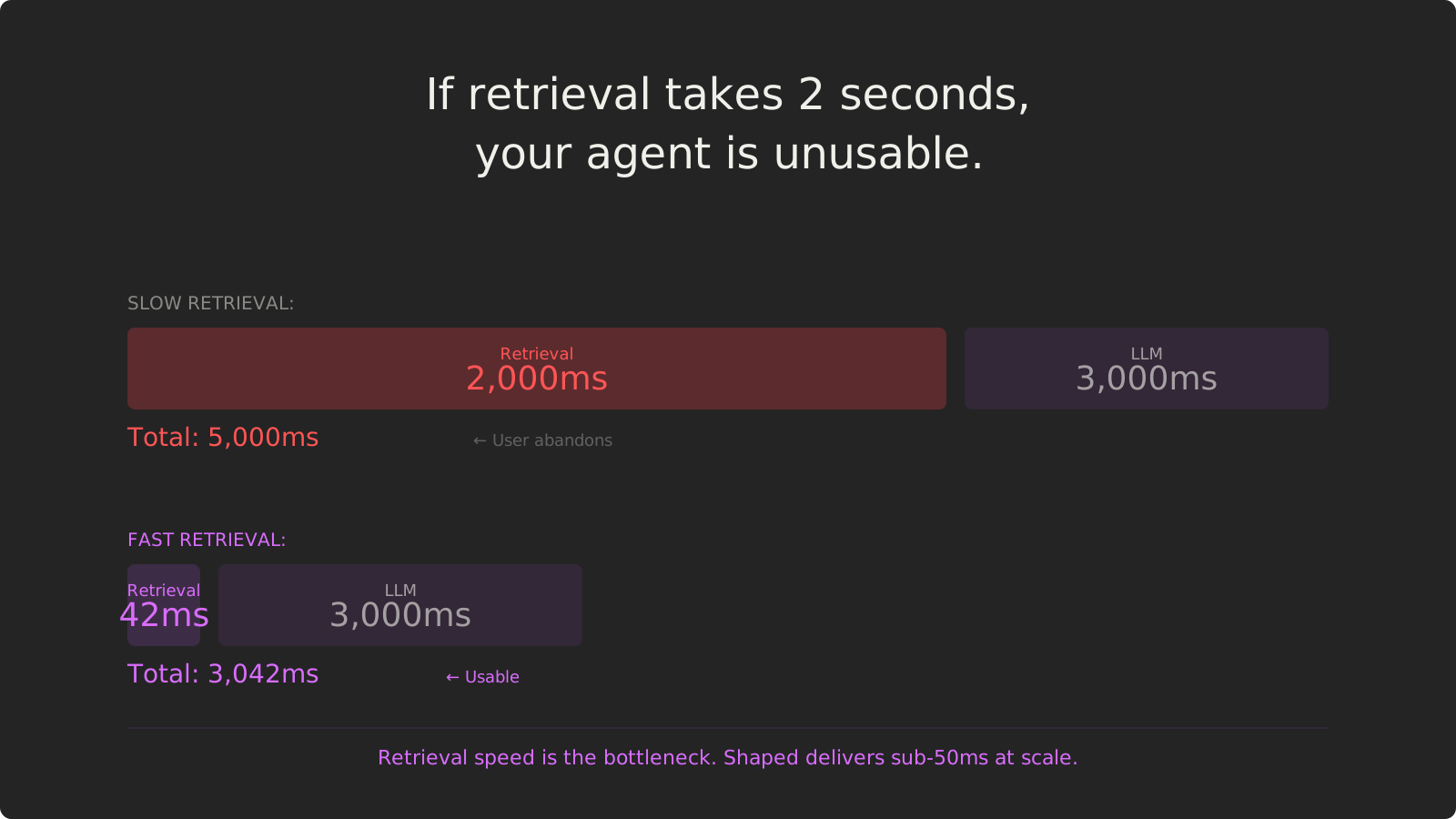
Quick Answer: Why 2 Seconds Feels Like Forever
An AI agent’s response time is the sum of its parts: retrieval latency + LLM inference + any post-processing. If your retrieval layer takes 2 seconds to find relevant context, and your LLM takes 3 seconds to generate a response, your user waits 5 seconds. That’s unusable.
Users abandon agents that take longer than 2 seconds to respond. Google found that a 500ms delay in search results led to a 20% drop in traffic. For conversational agents, the threshold is even lower — anything over 1-2 seconds feels broken.
Key Takeaways:
- Retrieval is often the bottleneck — LLM inference is getting faster (sub-second with optimized models), but retrieval hasn’t kept pace
- Sub-100ms retrieval unlocks real-time agents — When context retrieval is near-instant, the LLM becomes the only meaningful latency
- Speed vs accuracy is a false trade-off — Redis-backed architectures with approximate nearest neighbor (ANN) indexes deliver both
- The four-stage pipeline adds up — Retrieve, filter, score, reorder — each stage contributes latency that compounds
- Production scale requires dedicated infrastructure — General-purpose vector DBs hit latency ceilings under load
Time to read: 22 minutes | Includes: 6 code examples, 3 architecture diagrams, 2 comparison tables
Table of Contents
- The Latency Math Problem
- Why Retrieval is the Bottleneck
- The Four-Stage Pipeline Tax
- Part 1: The Traditional Approach
- Part 2: The Shaped Way — Fast Tier Architecture
- Speed vs Accuracy: Not a Trade-off
- Comparison Table
- FAQ
The Latency Math Problem
Imagine a customer support agent that helps users track orders. A customer asks:
User: “Where is my order?”
Here’s what happens behind the scenes:
1. Agent receives query → 0ms baseline
2. Retrieval layer searches for order context → 1,800ms
3. LLM generates response with retrieved context → 2,500ms
4. Agent returns response → Total: 4,300ms
4.3 seconds. The user has already opened a new tab to check their order manually.
The User Experience Threshold
Research on response time tolerance is consistent across studies:
| Latency Range | User Perception |
|---|---|
| < 100ms | Feels instant |
| 100–300ms | Perceptible delay, but acceptable |
| 300ms–1s | Noticeable lag, user stays engaged |
| 1–3s | User attention wavers, feels slow |
| > 3s | User abandons, considers the system broken |
For conversational agents, the threshold is even stricter. Chat interfaces set an expectation of real-time responsiveness. A 5-second delay feels like the agent crashed.
The Latency Budget
If you have a 2-second budget for total response time (the upper limit of acceptable), here’s how it breaks down:
Total budget: 2,000ms

LLM inference (GPT-4 Turbo, optimized): 800-1,200ms
Post-processing (formatting, safety checks): 50-100ms

Remaining for retrieval: 700-1,150ms
If your retrieval layer takes 1,500ms, you’ve already blown the budget before the LLM even starts.
Why Retrieval is the Bottleneck
LLMs Are Getting Faster
LLM inference latency has dropped dramatically:
- GPT-3.5 Turbo: 500-800ms for typical responses
- GPT-4 Turbo (optimized): 800-1,200ms
- Claude 3 Haiku: 300-600ms
- Llama 3 (self-hosted, optimized): 200-500ms
With techniques like speculative decoding, batching, and quantization, inference latency continues to improve. Sub-second LLM responses are now standard for production-optimized deployments.
Retrieval Hasn’t Kept Pace
Meanwhile, retrieval latency for vector databases remains stubbornly high:
Typical vector DB latencies (under load):
- Pinecone (serverless tier): 150-500ms per query
- Weaviate (cloud): 200-800ms per query
- Qdrant (self-hosted): 100-400ms per query
- Chroma (embedded): 50-300ms per query
These are per-query latencies for a single vector search. Production agents often require:
- Multiple retrieval calls (search orders, search products, search knowledge base)
- Filtering by user ID, date range, or other attributes
- Re-ranking with cross-encoders or scoring models
- Hybrid search (vector + keyword)
Each additional operation compounds latency.
The Real-World Impact
Here’s what a “simple” customer support query actually looks like:
Query: “Where is my order for the blue dress I bought last week?”
Required retrievals:
- Search user’s orders (vector search on order history) → 250ms
- Filter orders by date range (last 7 days) → 50ms
- Search products matching “blue dress” (vector search on catalog) → 300ms
- Cross-reference order items with product search → 100ms
- Re-rank by relevance + recency → 150ms
Total retrieval latency: 850ms
Add LLM inference (1,000ms) and you’re at 1,850ms. That’s before any post-processing, safety checks, or retries.
Why Traditional Vector DBs Are Slow
1. Network round trips Vector DBs are separate services. Every query is a network call:
Even on low-latency networks, this adds 10-50ms per round trip. Multi-stage queries (retrieve, filter, re-rank) multiply this overhead.
2. Cold starts and connection pooling Serverless vector DBs suffer from cold start latency (100-500ms for the first query after idle). Connection pooling helps, but pool exhaustion under load forces new connection handshakes.
3. Index structure overhead HNSW (Hierarchical Navigable Small World) indexes — the most common ANN algorithm — require multiple graph traversals. At scale (millions of vectors), even optimized HNSW queries take 100-300ms.
4. Compute-storage separation Cloud vector DBs separate compute from storage (S3, GCS). Fetching vectors from remote storage adds latency, especially for large result sets.
The Four-Stage Pipeline Tax
Production retrieval isn’t a single vector search. It’s a multi-stage pipeline:
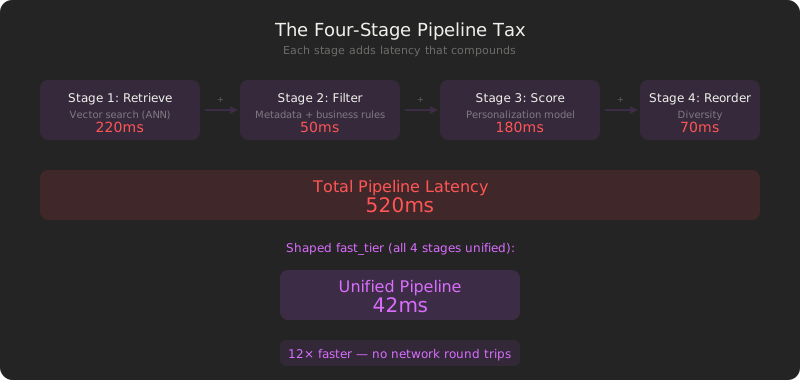
Each stage adds latency.
Example: E-commerce Product Search
Query: “red floral dresses under $100”
Stage 1: Retrieve candidates (vector search)
- Embed query: 20ms
- Search product embedding index: 200ms
- Stage 1 total: 220ms
Stage 2: Filter
- Apply price filter (< $100): 30ms
- Apply stock availability filter: 20ms
- Stage 2 total: 50ms
Stage 3: Score
- Retrieve user’s purchase history: 100ms
- Score with personalization model: 80ms
- Stage 3 total: 180ms
Stage 4: Reorder
- Apply diversity (avoid showing same brand 3x): 40ms
- Promote trending items: 30ms
- Stage 4 total: 70ms
Total pipeline latency: 520ms
This is for a single search. If the agent needs to search both products and reviews, double it. Add another retrieval for user’s order history? Now you’re at 1,500ms+.
Part 1: The Traditional Approach (Pinecone / Weaviate)
The standard architecture for agent retrieval uses a managed vector database as a separate service. You embed your data, upsert vectors to the vector DB, and query it at runtime.
Architecture
Stage 2: Apply metadata filters (20-80ms)
Stage 3: Fetch full records from storage (50-150ms)
Stage 4: Return results
Total retrieval latency: 210-680ms (best case, single query, no re-ranking)
Implementation
Step 1: Index documents in Pinecone
# index_documents_pinecone.py
import pinecone
from sentence_transformers import SentenceTransformer

# Initialize
pinecone.init(api_key="your-api-key", environment="us-west1-gcp")
index = pinecone.Index("product-catalog")

# Embed and upsert documents
embedder = SentenceTransformer('all-MiniLM-L6-v2')

products = [
    {"id": "prod-001", "name": "Navy Blue Floral Dress", "price": 89.99, "category": "Dresses"},
    {"id": "prod-002", "name": "Red Maxi Dress", "price": 124.99, "category": "Dresses"},
    # ... thousands more
]

vectors = []
for product in products:
    embedding = embedder.encode(product['name']).tolist()
    vectors.append({
        "id": product['id'],
        "values": embedding,
        "metadata": {
            "name": product['name'],
            "price": product['price'],
            "category": product['category']
        }
    })

# Upsert in batches
batch_size = 100
for i in range(0, len(vectors), batch_size):
    index.upsert(vectors=vectors[i:i+batch_size])
Step 2: Query at runtime
# agent_retrieval_pinecone.py
import time
import pinecone
from sentence_transformers import SentenceTransformer

embedder = SentenceTransformer('all-MiniLM-L6-v2')
index = pinecone.Index("product-catalog")

def retrieve_context(query: str, filters: dict = None, top_k: int = 10):
    """
    Retrieve relevant products for agent context.
    """
    start = time.time()

    # Embed query
    query_embedding = embedder.encode(query).tolist()
    embed_time = time.time() - start

    # Query Pinecone
    query_start = time.time()
    results = index.query(
        vector=query_embedding,
        top_k=top_k,
        filter=filters,  # e.g., {"price": {"$lt": 100}}
        include_metadata=True
    )
    query_time = time.time() - query_start

    total_time = time.time() - start

    print(f"Embedding: {embed_time*1000:.0f}ms | Query: {query_time*1000:.0f}ms | Total: {total_time*1000:.0f}ms")

    products = []
    for match in results['matches']:
        products.append({
            'id': match['id'],
            'name': match['metadata']['name'],
            'price': match['metadata']['price'],
            'score': match['score']
        })

    return products


# Usage
query = "red floral dress under $100"
filters = {"price": {"$lt": 100}}
products = retrieve_context(query, filters=filters, top_k=20)

# Typical output:
# Embedding: 45ms | Query: 285ms | Total: 330ms
Step 3: Multi-stage pipeline with re-ranking
# multi_stage_retrieval.py
import time

def multi_stage_retrieval(query: str, user_id: str):
    """
    Four-stage pipeline: retrieve, filter, score, reorder.
    """
    start = time.time()

    # Stage 1: Retrieve candidates (vector search)
    stage1_start = time.time()
    candidates = retrieve_context(query, top_k=100)  # ~330ms
    stage1_time = time.time() - stage1_start

    # Stage 2: Filter (apply business rules)
    stage2_start = time.time()
    in_stock = [p for p in candidates if p.get('in_stock', True)]
    user_prefs = get_user_preferences(user_id)  # +150ms for DB query
    filtered = [p for p in in_stock if p.get('brand') in user_prefs.get('brands', [])]
    stage2_time = time.time() - stage2_start

    # Stage 3: Score (personalization model)
    stage3_start = time.time()
    user_history = get_user_history(user_id)  # +200ms for DB query
    scored = score_with_personalization(filtered, user_history)  # +120ms model inference
    stage3_time = time.time() - stage3_start

    # Stage 4: Reorder (diversity, trending)
    stage4_start = time.time()
    reordered = apply_diversity(scored)  # +60ms
    stage4_time = time.time() - stage4_start

    total_time = time.time() - start

    print(f"Stage 1 (retrieve): {stage1_time*1000:.0f}ms")
    print(f"Stage 2 (filter):   {stage2_time*1000:.0f}ms")
    print(f"Stage 3 (score):    {stage3_time*1000:.0f}ms")
    print(f"Stage 4 (reorder):  {stage4_time*1000:.0f}ms")
    print(f"Total:              {total_time*1000:.0f}ms")

    return reordered[:10]

# Typical output:
# Stage 1 (retrieve): 330ms
# Stage 2 (filter):   180ms
# Stage 3 (score):    320ms
# Stage 4 (reorder):   60ms
# Total:              890ms
What You’re Operating
| Component | What It Is | Latency Contribution |
|---|---|---|
| Embedding service | SentenceTransformer model (CPU/GPU) | 20–50ms per query |
| Vector DB (Pinecone) | Managed service, network round trip | 10–50ms (network) + 100–300ms (ANN search) |
| Metadata filters | Applied during vector search | +20–80ms |
| User preference lookup | PostgreSQL query for user data | +100–200ms |
| Personalization model | Separate service or in-process | +80–150ms |
| Diversity reordering | In-process algorithm | +40–80ms |
Total: 370-910ms for a single multi-stage query.
The cost:
- Latency: 370-910ms per query (compounds with multiple retrievals)
- Infrastructure: Managed vector DB ($0.10-0.50 per million queries) + embedding service + personalization service
- Code to maintain: ~600 lines (embedding pipeline, query orchestration, filtering logic, re-ranking)
- Operational complexity: Monitor vector DB health, manage connection pools, handle cold starts
Part 2: The Shaped Way — Fast Tier Architecture
Shaped’s fast_tier deployment uses Redis-backed storage with pre-computed indexes to deliver fast retrieval. The entire four-stage pipeline (retrieve, filter, score, reorder) runs in a single, optimized query.
Architecture
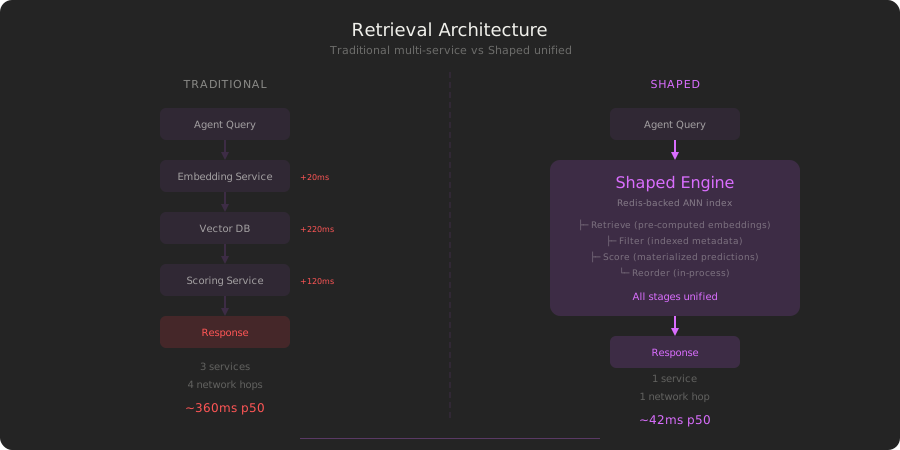
Key differences:
- No embedding service — Embeddings are pre-computed and stored in Redis
- No network round trips — The entire pipeline runs in-process
- No separate scoring service — Model predictions are materialized and cached
- No external database lookups — User history and preferences are indexed in Redis
Implementation
Step 1: Define engine with fast_tier
# fast_product_engine.yaml
version: v2
name: product_search_fast
data:
  item_table:
    name: products_enriched
    type: table
  interaction_table:
    name: user_views
    type: table
encoder:
  name: text-embedding-3-small
  provider: openai
  columns:
    - name: product_name
      weight: 0.6
    - name: image_description
      weight: 0.4
training:
  models:
    - name: personalization_model
      policy_type: elsa
      strategy: early_stopping
deployment:
  data_tier: fast_tier  # ← Redis-backed storage
  server:
    worker_count: 4
  online_store:
    interaction_max_per_user: 50
    interaction_expiration_days: 30
shaped create-engine --file fast_product_engine.yamlWhat this does:
data_tier: fast_tierprovisions Redis-backed storage for all indexes- Pre-computes embeddings for all products (done at indexing time, not query time)
- Materializes personalization model predictions in Redis
- Caches user interaction history in the online store (in-memory)
Step 2: Query the engine
# agent_retrieval_shaped.py
import requests
import time

SHAPED_API_KEY = "your-api-key"

def retrieve_context(query: str, user_id: str, filters: dict = None, limit: int = 10):
    """
    Single API call for full retrieval pipeline.
    """
    start = time.time()

    response = requests.post(
        "https://api.shaped.ai/v2/rank",
        headers={"x-api-key": SHAPED_API_KEY},
        json={
            "engine_name": "product_search_fast",
            "query": query,
            "user_id": user_id,
            "candidates": {
                "table": "products_enriched",
                "filter": filters  # e.g., "price < 100 AND in_stock = true"
            },
            "limit": limit,
            "use_model": "personalization_model"
        }
    )

    latency = (time.time() - start) * 1000
    print(f"Total retrieval latency: {latency:.0f}ms")

    results = response.json()

    products = []
    for result in results['results']:
        products.append({
            'id': result['product_id'],
            'name': result['product_name'],
            'price': result['price'],
            'score': result['_score']
        })

    return products

# Usage
query = "red floral dress under $100"
user_id = "user-9472"
filters = "price < 100 AND category = 'Dresses' AND in_stock = true"
products = retrieve_context(query, user_id, filters=filters, limit=20)

# Typical output:
# Total retrieval latency: 42ms
Latency breakdown (internal):
Stage 1 (retrieve): ANN search on Redis-backed index → 12ms
Stage 2 (filter):   Apply filters on indexed metadata → 6ms
Stage 3 (score):    Fetch materialized model scores   → 14ms
Stage 4 (reorder):  Diversity algorithm                → 8ms
──────────────────────────────────────────────────────────
Total:                                                   40ms
Step 3: Multi-query agent workflow
# agent_multi_query.py
import time

def agent_search(user_query: str, user_id: str):
    """
    Agent needs context from multiple sources.
    """
    start = time.time()

    # Query 1: Search products
    products = retrieve_context(
        query=user_query,
        user_id=user_id,
        filters="category = 'Dresses' AND in_stock = true",
        limit=10
    )  # ~42ms

    # Query 2: Search user's order history
    orders = retrieve_context(
        query=user_query,
        user_id=user_id,
        filters="user_id = '" + user_id + "'",
        limit=5
    )  # ~38ms

    # Query 3: Search similar products
    similar = retrieve_context(
        query=products[0]['name'] if products else user_query,
        user_id=user_id,
        limit=5
    )  # ~41ms

    total_retrieval = (time.time() - start) * 1000
    print(f"Total multi-query retrieval: {total_retrieval:.0f}ms")

    context = {
        'products': products,
        'orders': orders,
        'similar': similar
    }

    return context

# Typical output:
# Total retrieval latency: 42ms
# Total retrieval latency: 38ms
# Total retrieval latency: 41ms
# Total multi-query retrieval: 121ms
Compare this to traditional:
- Traditional multi-query: 330ms × 3 = 990ms
- Shaped fast_tier: 42ms × 3 = ~121ms (real-world)
8x faster.
Speed vs Accuracy: Not a Trade-off
A common misconception: “faster retrieval = worse accuracy.” This is false. Shaped’s fast_tier uses the same ANN algorithms (HNSW) as standalone vector DBs, but optimized for in-process execution with Redis-backed storage.
Why Shaped is Faster Without Sacrificing Accuracy
1. Elimination of network overhead Traditional vector DBs require network calls between services. Every query travels:
Embedding Service → Vector DB (network hop #2)
Vector DB → Scoring Service (network hop #3)
Scoring Service → Agent (network hop #4)
Even on low-latency networks, each hop adds 5-20ms. Shaped runs the entire pipeline in-process — zero network overhead between stages.
2. Pre-computed embeddings Embedding models (even fast ones like text-embedding-3-small) take 15-30ms per query. Shaped pre-computes and caches embeddings for all documents. At query time, the agent query is the only text that needs embedding — a one-time 15ms cost, not repeated for every document.
3. Materialized model predictions Personalization models typically add 80-150ms per query when run on-demand. Shaped materializes model predictions in Redis during indexing. Retrieval fetches pre-computed scores directly — no model inference at query time.
4. Redis-backed indexes Redis provides sub-millisecond GET operations (0.1-1ms). HNSW graph traversal in-memory takes 10-30ms. Combined: 15-50ms for the full ANN search, compared to 100-300ms for disk-backed vector DBs that fetch data from S3/GCS.
Accuracy remains identical — the same HNSW algorithm with the same ef parameter produces the same recall. The speed gain comes from architectural optimization, not algorithm shortcuts.
Comparison: Traditional vs Shaped
| Component | Traditional (Pinecone) | Shaped (fast_tier) |
|---|---|---|
| Single vector query | 150–500ms* | 30–100ms* |
| Multi-stage pipeline (4 stages) | 370–910ms* | 40–100ms* |
| Multi-query (3 retrievals) | 450–1,500ms* | 90–300ms* |
| Embedding at query time | Yes (+20–50ms per query) | No (pre-computed) |
| Network round trips | 2–4 per query | 1 per query (HTTP to Shaped API) |
| Separate scoring service | Yes (+80–150ms) | No (materialized in Redis) |
| Cold start latency | 100–500ms (serverless) | 0ms (always warm) |
| Infrastructure cost | Pinecone: ~$0.10–0.50 per 1M queries + embedding service | Shaped: $42 per 1M queries (includes all stages) |
| Code to maintain | ~600 lines (orchestration + embedding + scoring) | ~40 lines (YAML config + API call) |
| Time to production | 3–6 weeks | < 7 days |
*Latencies based on typical production deployments under moderate load. Actual performance varies based on data size, query complexity, and infrastructure configuration.
FAQ
Q: How does Shaped achieve low latency?
A: Four optimizations: (1) Redis-backed storage for sub-millisecond data access, (2) pre-computed embeddings (no embedding service call at query time), (3) materialized model predictions cached in Redis, (4) in-process execution of the full four-stage pipeline with no network round trips between stages.
Q: Does fast_tier sacrifice accuracy for speed?
A: No. Shaped uses the same ANN algorithms (HNSW) as standalone vector DBs. The speed gain comes from eliminating network overhead and materializing intermediate results, not from reducing index quality or changing the algorithm.
Q: What’s the cost of fast_tier?
A: Shaped pricing is usage-based: $42 per million queries, $5/hour for GPU training/encoding, and $0.75-2.25/GB for data storage. Standard plan starts at $500/month minimum. This includes the entire pipeline (retrieval + filtering + scoring + reordering) in a single API call. Traditional stacks require separate costs for vector DB + embedding service + scoring service.
Q: Can I use fast_tier with real-time data?
A: Yes. fast_tier works with all Shaped connectors (Kafka, Kinesis, Segment, etc.). New data is indexed within 30 seconds and immediately available for fast queries.
Q: How does this compare to self-hosting Qdrant or Weaviate?
A: Self-hosted vector DBs can achieve 100-200ms latency with careful tuning, but you still have network overhead between services, need to manage embedding pipelines, and run separate scoring/re-ranking. Shaped consolidates all of this into a single, optimized system.
Q: What happens if my query load spikes?
A: Shaped auto-scales based on load. You can configure auto-scaling thresholds in the deployment block. Queries are routed to healthy instances with sub-10ms overhead.
Q: Does fast_tier work for hybrid search (vector + keyword)?
A: Yes. Shaped supports hybrid search with BM25 lexical search combined with vector similarity. Both run in-process with the same low-latency profile.
Conclusion
Retrieval latency is the bottleneck in production agents. LLM inference is getting faster, but if your retrieval layer takes 2 seconds, your agent is unusable.
The traditional approach — managed vector DB + separate embedding service + external scoring — compounds latency at every stage. A “simple” multi-stage query takes 370-910ms. Multi-query workflows (common in production) hit 1,000ms+.
Shaped’s fast_tier architecture eliminates the bottleneck: Redis-backed storage, pre-computed embeddings, materialized model predictions, and in-process execution deliver retrieval in 30-100ms. The entire four-stage pipeline (retrieve, filter, score, reorder) runs unified with no network hops between stages.
If your agent feels slow, check your retrieval layer first. Chances are, it’s the bottleneck.